This action will delete this post on this instance and on all federated instances, and it cannot be undone. Are you certain you want to delete this post?

This action will block this actor and hide all of their past and future posts. Are you certain you want to block this actor?
This action will block this object. Are you certain you want to block this object?
Are you sure you want to delete the OAuth client [Client Name]? This action cannot be undone and will revoke all access tokens for this client.
Are you sure you want to revoke the OAuth token [Token ID]? This action cannot be undone and will immediately revoke access for this token.
| Introduction | https://epiktistes.com/introduction |
|---|---|
| GitHub | https://github.com/toddsundsted/ktistec |
| Pronouns | he/him |
| 🌎 | Sector 001 |

I've finally fixed a mysterious bug that was reported while I was traveling. I thought it would be interesting to share the investigation and resolution. Plus, it's an excuse to do some writing...
Rules-based logic has been part of ktistec for a while, and the rules engine has been running successfully in production for me and others, so I was surprised to learn that the recent introduction of a new rule resulted in spurious notifications. The rule in question is supposed to create a notification when someone replies to one of your posts. Instead, the rule was creating a notification when anyone replied to anything.
rule "create/reply" condition activity, IsAddressedTo, actor condition CreateActivity, activity, object: object condition Object, object, in_reply_to: other condition Object, other, attributed_to: actor none Notification, owner: actor, activity: activity assert Notification, owner: actor, activity: activity end
I had unit tests for the rule's logic, and the logic seemed correct when I visually inspected the rule again. To top it off, I wasn't able to find a set of steps that reproduced the problem locally.
For various poor reasons, I hadn't tried the rule in production myself. With no other obvious path forward, I deployed it and waited. Sure enough, the bug surfaced—along with a stack trace helpfully correlated with every occurrence of the bug. Jackpot—or so I thought!
Exception: relationship: already exists (Ktistec::Model::Invalid) from /workspace/src/framework/model.cr:650:9 in 'save' from /workspace/src/framework/model.cr:649:7 in 'save' from /workspace/src/rules/content_rules.cr:49:3 in 'assert' from /workspace/src/utils/compiler.cr:118:5 in 'assert' from /workspace/src/utils/compiler.cr:39:19 in '->' from /workspace/lib/school/src/school/rule/rule.cr:38:23 in 'call' from /workspace/lib/school/src/school/domain/domain.cr:158:9 in 'run' from /workspace/src/rules/content_rules.cr:89:5 in 'run' from /workspace/src/controllers/inboxes.cr:248:5 in '->' ...
The stack trace was curious for two reasons. The error occurred when creating (asserting) the notification because a notification already existed, which 1) shouldn't be possible because the assertion is preceded by a guard condition that ensures that the notification does not exist! And of course, 2) the notifications were spurious—rule evaluation shouldn't have resulted in a notification in the first place...! Luckily for me, it soon got even weirder.
It's possible to trace rule evaluation. Turning tracing on revealed a surprising mystery: 3) thousands of successful activations of the "create/reply" rule for any given reply. Thousands! That did explain something, though. The first successful activation created the spurious notification. The second activation raised the error (because the notification had just been created). When evaluating rules, all matches are first found, and then all actions are taken, therefore, in this case, the guard condition couldn't have had any effect. The error also terminated any further action processing, so there was only one stack trace.
So, I swapped one curiosity for a mystery—but why were there thousands of matches for that rule? There should have been only one (really, none).
A trace prints information about conditions and the facts that match, along with information about the values that are bound to variables in the process.
Rule create/reply
Condition School::BinaryPattern(ContentRules::IsAddressedTo, School::Expression, School::Expression)
Match ContentRules::IsAddressedTo, bindings: activity=#<ActivityPub::Activity::Create iri=...> actor=#<ActivityPub::Actor::Person iri=...> []
Condition ContentRules::CreateActivity
Match #<ActivityPub::Activity::Create iri=...>, bindings: object=#<ActivityPub::Object::Note iri=...> [activity=#<ActivityPub::Activity::Create iri=...> actor=#<ActivityPub::Actor::Person iri=...>]
Condition ContentRules::Object
Match #<ActivityPub::Object::Note iri=...>, bindings: [activity=#<ActivityPub::Activity::Create iri=...> actor=#<ActivityPub::Actor::Person iri=...> object=#<ActivityPub::Object::Note iri=...>]
Condition ContentRules::Object
Match #<ActivityPub::Object::Note iri=...>, bindings: other=#<ActivityPub::Object::Note iri=...> [activity=#<ActivityPub::Activity::Create iri=...> actor=#<ActivityPub::Actor::Person iri=...> object=#<ActivityPub::Object::Note iri=...>]
...Hmmm, that third condition... Nothing is bound to the variable other, as expected, yet the condition is treated as having successfully matched a fact. That's obviously incorrect—other should be the post being replied to. Or the condition should fail and rule evaluation terminate. Instead, since it is not bound but evaluation continues, other is free to be bound as necessary to satisfy the fourth condition. Which is exactly what happened.
The fourth condition matches posts that are attributed to me. Unless this condition is otherwise constrained—say, by a variable bound in the previous condition—there are going to be thousands of matches. Sokath, his eyes opened!
So, here's the fix. It's in the code that binds variables to values. in_reply_to is an association on a post (object) that links it to the post (object) it's a reply to. This code is inside a block that processes every potential match.
{% for association in associations %}
if @options.has_key?({{association.id.stringify}})
if (target = @options[{{association.id.stringify}}]) && (name = target.name?) && !temporary.has_key?(name)
- if (value = model.{{association.id}}?(include_deleted: true, include_undone: true))
- temporary[name] = value
- end
+ next unless (value = model.{{association.id}}?(include_deleted: true, include_undone: true))
+ temporary[name] = value
end
end
{% end %}The post that's being replied to isn't always cached locally. When it's not, the association returns nil and nothing is bound. That's okay. But previously, the match was also considered to be successful! The solution... treat it as a failure and proceed to the next potential match.

some unanticipated side effects of the exodus from twitter:
i'm jet lagged and awake, so i might as well get started on 1 and 3...

well... i'm going to find out if i've got indexes in all the right places...!

Sometimes pointing things out is useful.
Watson and Crick pointed out that a double helix was the structure of DNA most compatible with results from x-ray crystallography experiments and then went on to win a Nobel Prize (they did not discover DNA, by the way—Miescher did, in the 1860s). In the 1960s, the publication by Kempe et al of "The Battered-Child Syndrome" pointed out that parents are often the ones to blame for mysterious injuries to their children (before this it was considered impossible or at least improbable that parents would ever willingly injure their own children).
These examples aside, in my experience problems are generally obvious, or at least well indicated by others' pointing. What's needed is not more pointing. What I'd like to see is more action!


For those who are impatient, here is the quick and dirty procedure:
DNS
0. You need a domain name for this to work. You have two choices
(a) Head over to any of the domain registrars like domains.google and buy a domain name-- say mydomain.org, or
(b) use a free dynamic dns service like freemyip which will get you something like mydomain.freemyip.com. If you use a dynamic dns, you will have to use Let Us Encrypt to handle your own certificate. If you own the domain, you can use Cloudflare to https-front-end your server. If using the freemyip, make sure to save your token securely.
In the steps below, I will mark (a) or (b) based on the solution you chose.
Ktistec
Ktistec is a server that supports the ActivityPub protocol. That is, in simple terms, it can collaborate with Mastodon and other servers that support ActivityPub. One trouble we have is that Ktistec does not distribute binaries yet, so we have to build it on our own. Unfortunately the Oracle free tier does not have sufficient computing power to build it. So you will have to build it in a local machine. I use an Ubuntu 22.04 vagrant image to build it (I used the Ubuntu 22.04 image because that is what is available in Oracle free tier box).
1. Within the vagrant box, checkout Ktistec
git clone https://github.com/toddsundsted/ktistec; cd ktistec
2. Use the provided docker to build an image.
docker build -t "ktistec:latest" .
3. Export the docker image
docker save ktistec:latest | gzip > ktistec.tgz
Oracle Cloud
Next, we host the Ktistec instance in the oracle cloud. We have to do three things; Create and prepare a free compute box, start the server, and open ports so that it is accessible over the public internet.
5. Head over to the oracle cloud, create a free compute box instance with the Ubuntu 22.04 image. Prepare the image so that it can run docker. Digital ocean has a reasonable tutorial. Make sure to create your own ssh keypair and upload the public key when creating the compute box. We need to connect to the machine using SSH. Also, make sure that you have a public IP when you create the compute box. Copy the public IP once the machine is created. (You can delete and recreate machines easily, so if you make a mistake, start over)
6. Next, we copy ktistec.tgz to this machine,
scp ktistec.tgz my_public_ip:~/
7. Connect to your machine
ssh my_public_ip
7. Load the docker image within your newly created machine.
docker image load -i ~/ktistec.tgz
8. Check it has loaded
docker image ls
REPOSITORY TAG IMAGE ID CREATED SIZE
ktistec latest 22d6ac8c8cd5 2 days ago 37.1MB
9. Start the machine. You have two options here.
(a) The first is if you own the domain name.
mkdir -p ktistec/db ktistec/uploads; cd ktistec; docker run -p 80:3000 \ -v `pwd`/db:/db -v `pwd`/uploads:/uploads ktistec:latest
(b) If you are using the freemyip subdomain, then you need a separate nginx reverse proxy to front end your system. In that case run this instead.
mkdir -p ktistec/db ktistec/uploads; cd ktistec docker run -p 3000:3000 \ -v `pwd`/db:/db -v `pwd`/uploads:/uploads ktistec:latest
Note that the db and uploads contain the data from your instance. Back them up periodically.
Next, we open the ports in Oracle cloud so that browsers outside can connect to port 80 if you are using a custom domain and cloudflare, and port 443 if you are going with freemyip and letusencrypt.
6. In cloud.oracle.com, click on [Instance Information] -> [Primary VNIC: Subnet]
7. Click on default security list, click on [Add Ingress Rules]
(a) domain+cloudflare --- Stateless, Source CIDR is 0.0.0.0/0 IP Protocol is TCP, Destination port range is 80
(b) freemyip+letusencrypyt --- Stateless, Source CIDR is 0.0.0.0/0 IP Protocol is TCP, Destination port range is 443 create another rule for 80 also. You will need it for testing, but you can turn it off later.
9. HTTPS Frontend.
(a) If using cloud flare, head over to CloudFlare, add site (your sitename), choose the free plan. Add DNS Records, create a [A] record with [@] or the full name for your site, content is the public ip of the oracle instance you just created, and mark proxied.
At this point, you are done, and your Ktistec instance will be available at https://mydomain.org. You will need to immediately open the instance in a browser and set the primary username password, and other site configuration details.
(b) if using freemyip+letusencrypt then you have to be a little careful. The usual method of creating a certificate requires you to add a TXT record to DNS or use nginx directly. I have not been able to get this to work. Instead, follow these steps to generate a letusencrypt certificate.
i) Install nginx on the system. Make sure that you can reach the nginx installation from outside by connecting to it over the http://<publicip>:80
sudo apt install nginx
If it does not work, flush your iptables so that it can connect from outside (not sure how better to do this, but if you are familiar with iptables, add a rule to connect instead. Flush worked for me.)
iptables -F
Try http://<publicip>:80 again. It should show the welcome page.
ii) To generate a certificate with letusencrypt, you need to first install certbot.
sudo snap install --classic certbot sudo ln -s /snap/bin/certbot /usr/bin/certbot
ii) Next, generate the certificate manually with http (I could not get DNS to work. It requires adding a TXT record to freemyip subdomain. While it is mentioned in the webpage of freemyip, the TXT record never gets added).
sudo certbot -d <mydomain>.freemyip.com \
--manual --preferred-challenges http certonlyiii) Provide <mydomain>.freemyip.com as the domain name if asked. It will ask you to place a file <filename> inside the root directory of nginx followed by .well-known/acme-challenge/ with a value <the value>. The root directory is typically at /var/www/html. So, you have to create the directory, and place the file.
mkdir -p /var/www/html.well-known/acme-challenge/
echo <the value> \
> /var/www/html.well-known/acme-challenge/<filename> iv) Make sure to check the file first
wget http://<mydomain>.freemyip.com/.well-known/acme-challenge/<filename>
If no errors, then press enter in the console for certbot and continue. You will see something like
Successfully received certificate.
Certificate is saved at: /etc/letsencrypt/live/<mydomain>.freemyip.com/fullchain.pem
Key is saved at: /etc/letsencrypt/live/<mydomain>.freemyip.com/privkey.pem
This certificate expires on 2023-02-09.
These files will be updated when the certificate renews.
v) Make it available on nginx by adding the following in the following file.
sudo touch /etc/nginx/sites-available/<mydomain>.freemyip.com
sudo ln -s /etc/nginx/sites-available/<mydomain>.freemyip.com \
/etc/nginx/sites-enabled/vi) Then edit /etc/nginx/sites-available/<mydomain>.freemyip.com and add the following.
server {
listen *:80;
listen [::]:80;
server_name _;
listen 443 ssl;
# RSA certificate
ssl_certificate /etc/letsencrypt/live/<mydomain>.freemyip.com/fullchain.pem;
ssl_certificate_key /etc/letsencrypt/live/<mydomain>.freemyip.com/privkey.pem;
include /etc/letsencrypt/options-ssl-nginx.conf;
# reverse proxy
location / {
proxy_pass http://localhost:3000;
include proxy_params;
}
# Redirect non-https traffic to https
if ($scheme != "https") {
return 301 https://$host$request_uri;
}
}vii) Restart nginx
sudo systemctl restart nginx
At this point, your site should be available as https://mydomain.freemyip.com. You will need to immediately open the instance in a browser and set the primary username password, and other site configuration details.
Once this is done, you can remove the port 80 from the Ingress rules in oracle cloud.
More
If you find that the docker is taking up too much memory, you can also compile ktistec externally, and copy it over to the server. You will need to ensure the following files are available in the directory. The server is the ktistec executable. The ktistec.db is your ktistec database. The following are the files I have. You will have to copy over these files into the directory, either from the docker image or from elsewhere.
First, check the docker image
$ docker ps
CONTAINER ID IMAGE COMMAND ...
0e9882260f65 social:latest "/bin/server" ...
$ docker export 0e9882260f65 > s.tar
Now, you can check the files in the docker:
$ tar -tvpf s.tar | grep app
These are the same files you require, so copy these over.
$ tar -xvpf s.tar app/
Next, copy over the kitstec executable.
$ cp ~/ktistec.bin app/server
Next, copy over your ktistec.db to the same directory
$ cp ~/ktistec.db app/
The finished directory should look like this
$ pwd
/home/user/ktistec/app
$ ls
etc ktistec.db public server
$ find etc
etc
etc/rules
etc/rules/content.rules
etc/database
etc/database/schema.sql
etc/contexts
etc/contexts/w3id.org
etc/contexts/w3id.org/security
etc/contexts/w3id.org/security/v1
etc/contexts/w3id.org/security/v1/context.jsonld
etc/contexts/litepub.social
etc/contexts/litepub.social/context.jsonld
etc/contexts/www.w3.org
etc/contexts/www.w3.org/ns
etc/contexts/www.w3.org/ns/activitystreams
etc/contexts/www.w3.org/ns/activitystreams/context.jsonld
$ find public/
public/
public/mstile-150x150.png
public/android-chrome-192x192.png
public/favicon.ico
public/browserconfig.xml
public/dist
public/dist/site.bundle.js.LICENSE.txt
public/dist/597.bundle.js
public/dist/64b800aa30714fd916dc.woff2
public/dist/fcba57cdb89652f9bb54.gif
public/dist/747d038541bfc6bb8ea9.ttf
public/dist/09cd8e9be7081f216644.svg
public/dist/597.bundle.js.LICENSE.txt
public/dist/356a0e9cb064c7a196c6.woff
public/dist/site.bundle.js
public/dist/settings.bundle.js
public/dist/settings.bundle.js.LICENSE.txt
public/android-chrome-512x512.png
public/apple-touch-icon.png
public/logo.png
public/safari-pinned-tab.svg
public/mstile-70x70.png
public/mstile-144x144.png
public/mstile-310x150.png
public/mstile-310x310.png
public/3rd
public/3rd/themes
public/3rd/themes/default
public/3rd/themes/default/assets
public/3rd/themes/default/assets/fonts
public/3rd/themes/default/assets/fonts/Lato-Italic.woff2
public/3rd/themes/default/assets/fonts/brand-icons.woff2
public/3rd/themes/default/assets/fonts/Lato-Bold.woff2
public/3rd/themes/default/assets/fonts/outline-icons.woff2
public/3rd/themes/default/assets/fonts/Lato-BoldItalic.woff2
public/3rd/themes/default/assets/fonts/Lato-Regular.woff2
public/3rd/themes/default/assets/fonts/icons.woff2
public/3rd/themes/default/assets/images
public/3rd/themes/default/assets/images/flags.png
public/3rd/semantic-2.4.1.min.css
public/site.webmanifest
public/favicon-32x32.png
public/favicon-16x16.png
If you had any uploads, copy that directory over
$ cp -r ~/uploads/* public/uploads/
Finally, you can start the server
$ cd /home/user/ktistec/app; LOG_LEVEL=INFO ./server


morning all! introduce yourself if you're a recent follower.
for my part, i'm an electrical engineer by training who works as cto at a maritime decarbonization startup by day, and hacks on ktistec, a single user activitypub (fediverse) server, when time allows. i also play boardgames, study japanese, and i'm learning to play bagpipes.

We could observe a lunar eclipse from #Japan yesterday.
月 as single Kanji means 'the moon'
食 as single Kanji means 'to eat'
月食 then represents the whole event, so basically 'eaten by the moon'.
I think Kanji are just beautiful :)
https://youtu.be/cxxq7rY4uB0?list=TLGGE0CxkNAn2kUwODExMjAyMg


working from marseille. i love the water. it's snowing back home.


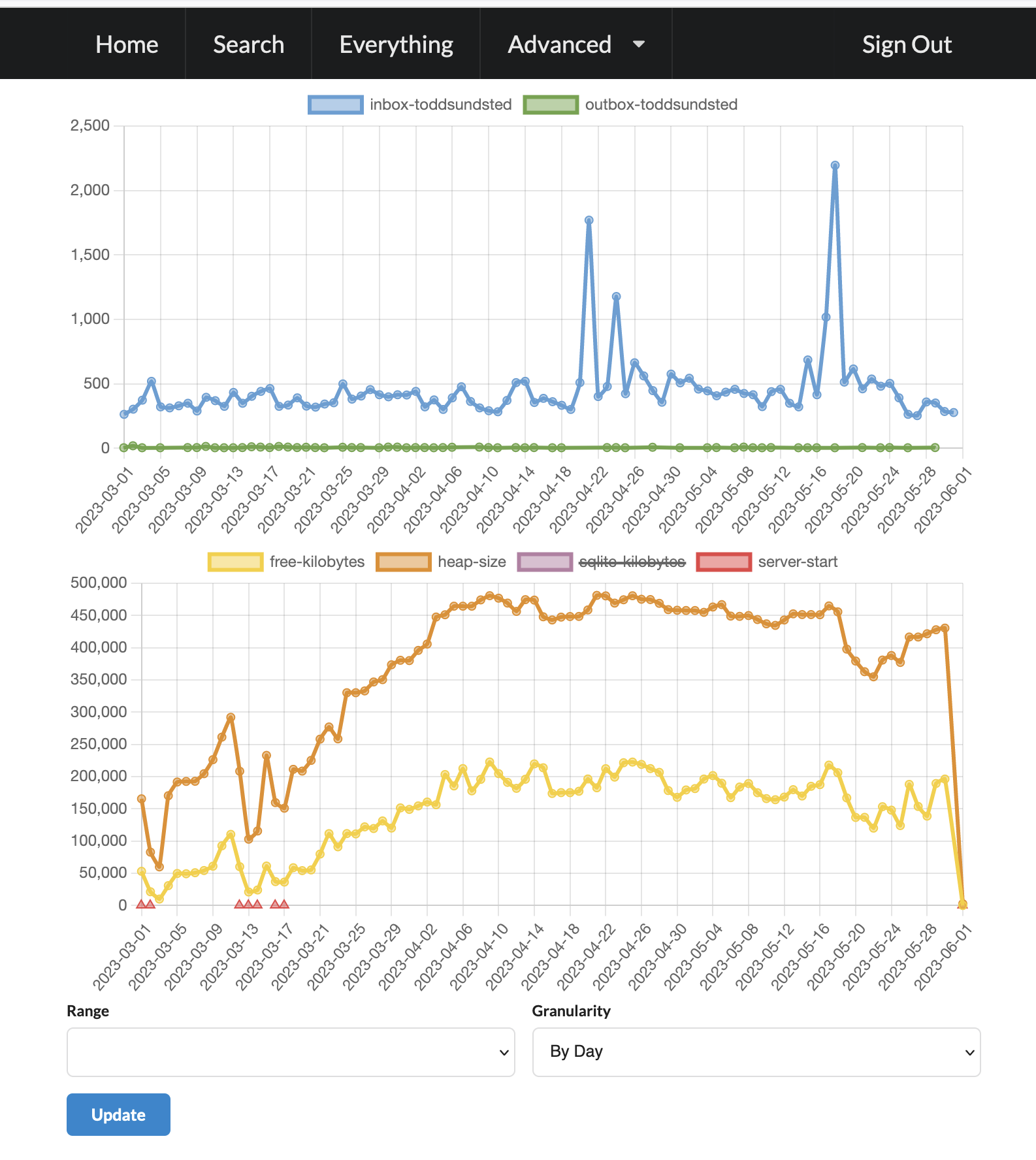
this chart shows inbound activitypub messages to my server. over time fediverse instances seem to receive increasing numbers of messages, many not addressed to anyone on the instance, so this represents an increase in that passive traffic, replies to other people's posts, as well as announcements/boosts/shares.
n.b. you can see all of the inbound messages to your ktistec server on the /everything endpoint.